Get a sleek and speedy MacBook Air while its on sale! Photo: Apple/Cult of Mac
The M4 MacBook Air launched in March but a deal on the 15-inch variant already lowers the cost by up to $260. The sale drops the price of the 15-inch M4 MacBook Air to just $1,011.45. That’s a stunning price (the lowest we’ve seen) for a beautiful and powerful macOS notebook. The 13-inch variant also sells for well below the usual.
Plus, MacBook Airs with M2 and M3 chips are still great machines, and deals knock up to $350 off some models.
Save on essential Microsoft software for Mac or PC. Photo: Cult of Mac Deals
Not a fan of monthly fees for software like Microsoft 365? This deal lands you a lifetime license to Microsoft Office Home & Business 2024 for Mac or PC.
WWDC25 won’t be as Apple Intelligence-packed as last year. Image: Apple/D. Griffin Jones/Cult of Mac
Apple doesn’t have as many Apple Intelligence features to announce at WWDC25 as it did during last year’s developer conference. However, a handful of new AI features should arrive, including Apple Intelligence-generated Shortcuts automations, an Apple Intelligence API for developers, and AI-powered health tips. Apple’s foundation language model itself will also be improved, with versions in four different sizes currently in testing.
Here’s what to expect on Apple Intelligence next Monday during the WWDC25 keynote.
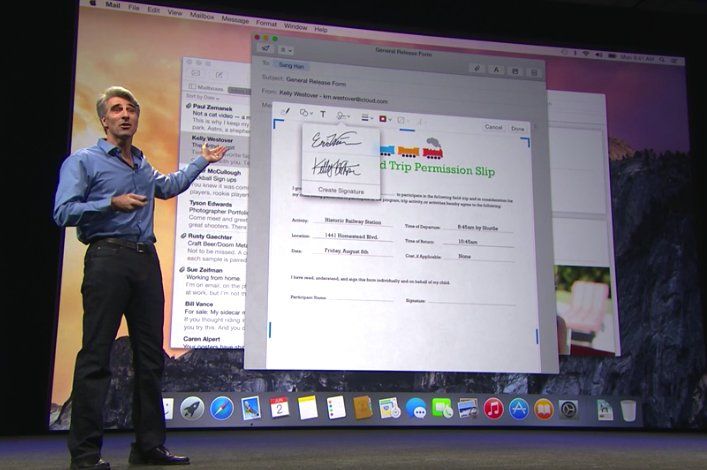
OS X Yosemite more strongly resembled iOS than previous versions of the Mac software. Photo: Apple
June 2, 2014: Apple shows off Mac OS X 10.10 Yosemite for the first time at its Worldwide Developers Conference in San Francisco. Following the Jony Ive-redesigned iOS 7, Yosemite boasts an aesthetic change that brings Apple’s desktop computers closer than ever to the look of the company’s mobile software.
Named after Yosemite National Park, the update follows the previous year’s Mavericks as the second Mac operating system named after a California landmark.
Cool wallpaper on that LG ultra-wide display, eh? There's also an old Mac mini hiding in this pic. Photo: [email protected]
Some computer setups showed off on social media aren’t packed with the latest and greatest tech gear — they just look great. Today’s featured setup is a fine example. It packs two still-going-strong older Macs — a MacBook Pro from 2021 and a Mac mini from all the way back in 2012 — driving an LG ultra-wide display. But the subtle lighting and tasteful decor, including great use of plants, go a long way in this one.
WWDC25 kicks off at Apple Park and (mostly) online June 9. Photo: Apple
WWDC25, this year’s edition of Apple’s Worldwide Developers Conference, will take place June 9 to 13, offering Apple enthusiasts and developers a comprehensive look at upcoming software innovations in the latest iOS, macOS and other platforms, the company said recently. The WWDC25 schedule, updated this week with the new moniker “Sleek Peek,” offers developers and users alike plenty of excitement.
The mostly online annual tech showcase promises groundbreaking updates across Apple’s ecosystem while also welcoming over 1,000 developers and students to a special in-person celebration at Apple Park.
Updates: Apple Developer’s WWDC25 web page added the name “Sleek Peek” for developer conference proceedings. Lots of new user interface design elements to take a look at, for one thing, as suggested in our looks ahead to what we expect will be called iOS 26, iPadOS 26 and macOS 26. Updates are also expected for tvOS 26, watchOS 26 and visionOS 26. Apple also set up the YouTube livestream page, so you can sign up for alerts, like when the Keynote starts.
Carrying an iPad onstage eased that crippling stage fright. Photo: George Beckker@Pexels
Classical pianist Simone Dinnerstein has performed on stages around the globe, from solo recitals to collaborations with prestigious orchestras. Famed composer Philip Glass even wrote a concerto specifically for her to perform. But stage fright nearly ended it all — until iPad saved her career, according to a new interview.
We’re used to iPhone saving lives and what-not, so it’s cool to see Apple’s tablet get some credit.
The EU's Digital Markets Act causes plenty of headaches for Apple. Photo: European Commission
Apple officially filed an appeal against the European Union’s Digital Markets Act interoperability requirements Friday. That’s no big surprise, and neither is the reason why. Apple argues the regulations pose significant privacy and security risks to iPhone users, while also stifling innovation.
Apple submitted its challenge to the EU’s General Court in Luxembourg, targeting the commission’s March decision that requires Apple to make iOS more compatible with rival products, including smartwatches, headphones and VR headsets.
Apple reportedly chose “Tahoe” as the name for the upcoming macOS version, according to a new report. This marks the third significant redesign of the Mac operating system since the company began using California-themed naming conventions in 2013.
The name macOS Tahoe, inspired by the iconic Lake Tahoe resort area, signals Apple’s commitment to delivering another major visual overhaul to its desktop platform.
iPad may finally get a native Instagram app. Illustration: ChatGPT
Meta finally released a native WhatsApp app for iPad last week, following years of user requests. Now, the company appears to be going “full steam ahead” with an Instagram app for Apple’s tablet.
The app may launch as early as this year, with internal testing already underway.
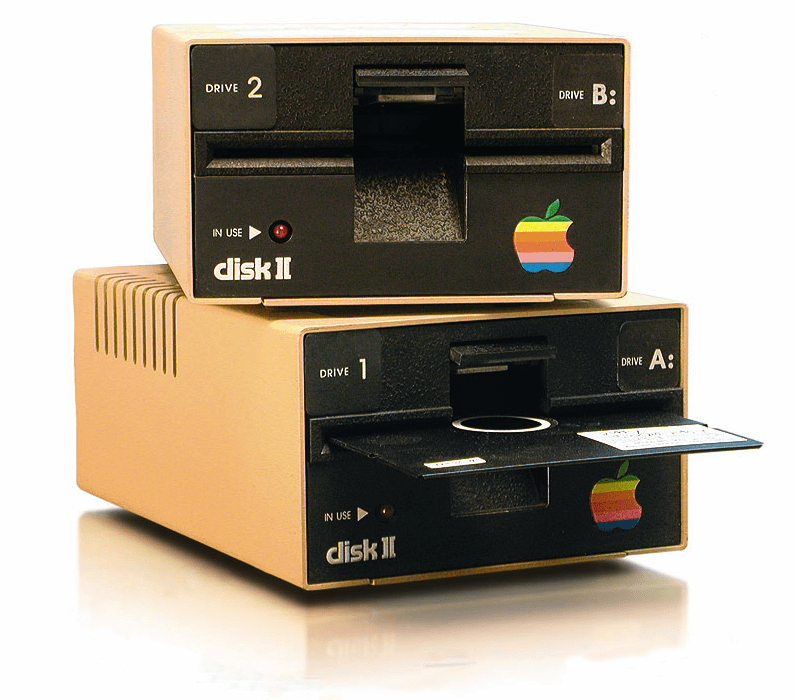
The Disk II floppy drive was anything but a flop for Apple. Photo: Wikipedia CC
June 1, 1978: Apple launches the Disk II floppy drive, one of the company’s most important peripherals ever.
The best floppy drive available at the time, Disk II solves the Apple II computer’s most glaring weakness — a lack of storage. It also helps establish Apple’s flair for handsome profit margins.
Get your HoomBand and Dodow sleep bundle while it's on sale. Photo: Cult of Mac Deals
thThe two sleep aid devices in this bundle might be the most unexpected sleep hack since warm milk: a Bluetooth headband and a guided meditation light, working together to help you beat insomnia.
You can listen to hypnotic stories and meditations (or your favorite podcasts) through the comfy HoomBand headband, while the Dodow light guides you through breathing exercises to help you fall asleep naturally.
When your Mac shows signs of sluggish performance, BuhoCleaner can speed it up.
Photo: Dr.Buho
Is your Mac’s performance getting a little sluggish? If your machine takes more time to do things than it used to — and that darned spinning beach ball keeps showing up — it’s time for some digital spring cleaning. What’s an effective, intuitive and affordable tool for the job? BuhoCleaner, a Mac maintenance app from Dr.Buho.
BuhoCleaner is available in both free and paid versions. With coupon code CTM25BC05 you can get up to a 70% exclusive discount.
SPONSORED
This post is brought to you by Dr.Buho.
I tested it on my M4 Pro MacBook Pro and noticed a significant performance boost after just a few simple scans. The machine became noticeably more responsive when opening apps and files.
The cast should be more excited! Image: Apple TV +
The Apple TV+ adventure movie Fountain of Youth shot to the top of the charts the first week it hit streaming, according to two companies that track ratings. The flick stars John Krasinski and Natalie Portman in a dangerous hunt for the legendary spring with the power to restore the lost youth of anyone who drinks from it.
Plus, the sci-fi comedy Murderbot, the crime drama Your Friends and Neighbors, and the comedy The Studio all continue to pull in large audiences. Apple TV+ subscribers have plenty of popular content to enjoy this week.
You can do it all with this AI-powered photo editor. Photo: Cult of Mac Deals
AI photo editor PicWish lets you remove backgrounds, unblur or sharpen pictures, and generally enhance your images in all kinds of ways. It’s easy to use but yields impressive results that would have been impossible (or required an advanced degree in an expensive tool like Adobe Photoshop) just a few years ago.
With this PicWish deal, you can slash the price of the credits you need to pull off these fantastic image tweaks. You can get 5,000 PicWish credits for just $59.99 (regularly $95.95).
Freeform is a weird and very underrated Apple app. Image: D. Griffin Jones/Cult of Mac
Apple’s Freeform app for iPhone, iPad, Mac and Vision Pro is a digital whiteboard you can use to brainstorm or gather ideas in one infinitely scrolling canvas.
You can use Freeform to throw together ideas with a colleague. You could build a presentation using Freeform’s scenes, kind of like using Prezi. Or, you can use Freeform as a drawing app with your iPad and Apple Pencil.
Freeform comes with all kinds of features for adding text boxes, rich links, drawings, clip art, sticky notes, files, photos, videos and more. It’s a great way to build a mood board or connect big ideas.
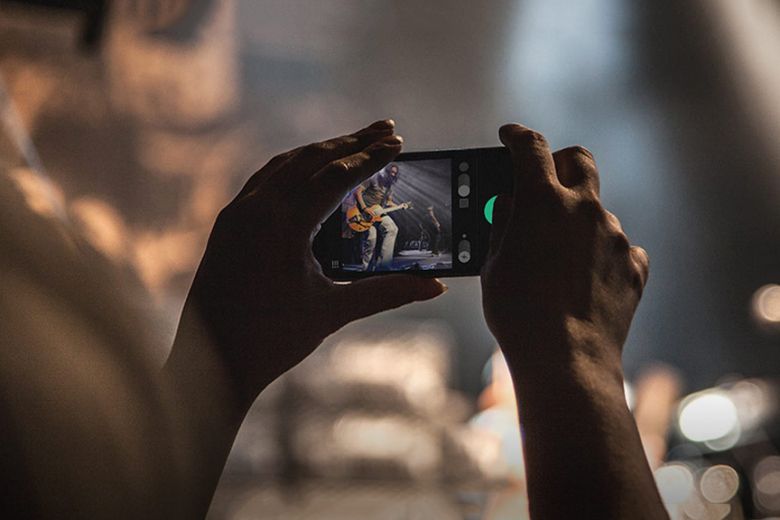
A big Chicago daily pulls the plug on staff photographers. Photo: HypeBeast
May 31, 2013: The Chicago Sun-Times fires all 28 of its photographers, with the goal of training its staff to shoot photos using iPhones instead. Pulitzer Prize winner John H. White is among those who lose their jobs.
The move is significant not just because of what it says about the declining newspaper industry. It also spotlights the iPhone’s growing acceptance as a professional camera.
Quit tearing your house apart trying to find your wallet. Photo: Cult of Mac Deals
While Apple’s AirTag is an incredible invention, helping you locate misplaced keys or luggage in seconds, the tracking tag’s circular design leaves an awkward lump if you cram one in your wallet. Luckily, the MagTag — a credit card-size wallet tracker that will slide right in — also works with Apple’s Find My network.
Yes, the MagTag functions much like an AirTag, giving you an easy way to find a lost wallet. And yet its sleek design won’t leave an unwanted bulge. It’s cheaper than an AirTag, too, and it’s even more affordable with an exclusive discount from Cult of Mac Deals.
Is the best copy of a picture you have blurry and pixellated? Use Google’s image lens tool to find the original. Image: D. Griffin Jones/Cult of Mac
You can use Google reverse image search to find a higher-resolution (and higher-quality) original version of an image online. If you’re putting together a presentation, making a YouTube video or writing a blog post, you want the highest quality versions of every image. You might feel stuck if you only have a low-quality picture and you need to fill a bigger space.
Google reverse image search will let you upload a photo and find matches all around the web. You can find out where it’s from to cite the source and save the uncompressed original image. Let me show you how Google reverse image search works.
That's quite an iPhone camera rig tracking that infected dude. Photo: Sony Pictures Entertainment
Danny Boyle will soon bring the infected back to the big screen in ways that would make any iPhone cinematographer jealous. The acclaimed director behind the original 28 Days Later returns for the long-awaited sequel 28 Years Later. And he uses cutting-edge iPhone technology alongside traditional filmmaking techniques to create what he calls a “poor man’s bullet time” effect (a la The Matrix movies), according to a new report.
Compact keyboards are so popular now that seeing a full-sized one -- or even a nearly full-size, tenkeyless layout like this one -- is almost a rarity. Photo: [email protected]
More than ever these days, computer setups flaunted on social media tend to show off compact keyboards with as low as 60% layouts. So it’s almost a surprise to come across today’s featured MacBook Pro setup, which relies on a tenkeyless keyboard. It’s almost, but not quite, full sized. And the excellent Keychron mechanical keeb is customizable, too.
Severance season three, currently on the writers' room drawing board, will enter production with two spinoff shows in early stages of development. Photo: Apple TV+
Apple TV+’s critically acclaimed series Severance will expand beyond its upcoming third season, possibly including two spinoffs and merchandise, according to recent revelations from director Ben Stiller and star Adam Scott in a new interview. That news alongside Severance season 3 progress should delight fans of the dystopian workplace drama as much as any “overtime contingency” could.
The road to multilingualism is 97% off right now with MosaLingua! Photo: Cult of Mac Deals
AI language learning app MosaLingua can speed up your mastery of nearly a dozen languages. It’s designed for busy people who want to make steady progress without carving out hours each day.
MosaLingua’s lessons are short and to the point, with most taking just 10 minutes to complete. Its advanced tools make learning a new language fun. And instead of sitting down for a whole language session, you can brush up whenever you have time.


 June 2, 2014: Apple shows off Mac OS X 10.10 Yosemite for the first time at its Worldwide Developers Conference in San Francisco. Following the


 June 1, 1978: Apple launches the Disk II floppy drive, one of the company’s most important peripherals ever.


 May 31, 2013: The Chicago Sun-Times fires all 28 of its photographers, with the goal of training its staff to shoot photos using iPhones instead. Pulitzer Prize winner


 May 30, 2013: Apple marks the sale of the 100 millionth