Early reviews of M4 iPad Pro are full of positives with some negatives. Screenshot: Apple
The first reviews of the M4 iPad Pro praise its slim design, its beautiful screen and its speedy new processor. But there’s also some criticism of the limitations imposed by iPadOS.
Read on for the highs and lows of early reviews of Apple’s new top-of-the-line tablet.
Compatibility with the new Apple Pencil Pro is one reason to buy this year's iPad Air. Photo: Apple
The first reviews of the 2024 iPad Air paint the tablet as a budget version of last year’s iPad Pro.
Here’s the consensus of the early M2 iPad Air reviews: If you want a big-screen iPad, but don’t need (or don’t want to pay for) high-end features like an OLED screen, Face ID and Apple’s most powerful processor, this is the tablet for you.
★★★★☆
A digital photo frame makes a great gift. Photo: Ed Hardy/Cult of Mac
The GPX Capture 7″ Wifi Photo Frame is ready to display pictures sent from your whole extended family. It’s so easy to use it makes a great gift for the non-techie mom in your life.
The touchscreen looks great, whether it’s showing images or short videos sent in from a free app.
I put digital photo frame in my home office for hands-on testing. And I love it.
You’re bound to find some of these handy. Image: D. Griffin Jones/Cult of Mac
These are the best Mac apps that’ll help you through all kinds of work — writing, graphic design, video editing — with a few simple (must-have) utilities that everyone can make use of.
Finding good apps can be hard, especially if you’re new to the Mac. Luckily, we’ve put together a list of the very best.
★★★☆☆
Edifier's sleek Comfo Run sports headphones don't enter your ear canal. Photo: David Snow/Cult of Mac
I’ve made no secret of my admiration for Edifier audio products in the past few years, but the streak couldn’t go on forever. But it’s not you, Edifier. It’s me, maybe. I blame my oversized head and clunky glasses for standing in the way of my affection for your sleek new Edifier Comfo Run sports headphones. I just couldn’t get the fit quite right for the best sound.
But I could see all sorts of athletes, and really anyone who prefers to keep earbuds and other objects out of their ear canals, loving these things. They work by air conduction.
Which earbuds work better with your iPhone? Photo/Graphics: Apple/Rajesh
If you want new wireless earbuds for your iPhone, Apple’s own AirPods Pro 2 are likely your top choice. But Apple offers another pair of earbuds you might consider: Beats Fit Pro. In this Beats Fit Pro vs. AirPods Pro 2 buying guide, we’ll compare the features of these two premium noise-canceling earbuds from Apple.
Do the Beats earbuds provide the same features and sound quality as Apple’s flagship earbuds? Find out in this comparison.
★★★★☆
mophie juice pack is two useful iPhone 15 accessories in one. Photo: Ed Hardy/Cult of Mac
The new mophie juice pack for iPhone 15 combines a protective case with a power bank. Simply put your handset in the case to greatly extend your battery life and add 6 feet of drop protection.
I did real-world testing on the version specifically for the iPhone 15. (mophie also sells juice packs for the iPhone 15 Pro and Pro Max, but not iPhone 15 Plus.)
★★★★☆
As a condo owner, I don't need more than Anker Solix C800 Plus to keep the place going in a power outage. Photo: David Snow/Cult of Mac
The Anker Solix c800 Plus Portable Power Station is a capable and versatile portable power station that can get you through a power outage or let you live like a king on a camping trip.
With a stout 768Wh lithium-ion battery, the device packs a punch. It allowed me to charge multiple devices simultaneously and power various appliances in a simulated blackout. Now I’m just waiting for the power to go out for real, or for someone to invite me camping.
★★★★☆
Zagg's new desk mat is also a wireless charger and a mousepad. Photo: Ed Hardy/Cult of Mac
The Zagg Desk Mat with Wireless Charging keeps your iPhone and other gear juiced up while also acting as a nonslip workspace, mousepad and stylus holder.
I put one in my home office and tested it with my iPhone and other accessories. Here’s how it went.
Our top pick for best audio interface for Mac is Universal Audio's Apollo Twin X Quad. Photo: Universal Audio
An audio interface serves as a bridge between your Mac and external audio sources like microphones and musical instruments. The hardware is essential for great sound reproduction, whether you’re a professional producer or a beginner. So finding the best audio interface for your Mac can significantly enhance your recording and mixing experience.
In this guide, we’ll explore top audio interfaces available for Mac, including several affordable options. We’ll discuss their features, performance, compatibility and price points to help you make an informed decision.
★★★★★
Enhance your video calls and content creation with the Belkin Auto-Tracking Stand Pro. Photo: Ed Hardy/Cult of Mac
The Belkin Auto-Tracking Stand Pro can hold up an iPhone, rotate and tilt to keep the camera focused on the user during video calls. It’s wish fulfillment for every TikTok or YouTube creator working alone. The same goes for anyone who’s frequently in video conferences. If you’re looking for aBelkin iPhone mount with MagSafe for Mac desktops and displays, there are solutions designed to enhance your workflow.
I went hands on with the accessory and my iPhone 15. And wow, this thing is impressive.
There's an AirTag hidden in there somewhere. Photo: Device Therapy
The Device Therapy Bike Mount & Reflector gives you a place to hide an Apple AirTag tracker. With this combination, you can (hopefully) track the location of your bike if it gets stolen because millions of iPhones around the world can report the location of your lost item.
These are all the best games on Apple Arcade. Image: D. Griffin Jones/Cult of Mac
It’s hard to know where to start on Apple Arcade because the service offers so many titles. But we scoured the catalog and found all the best Apple Arcade games so you can get right to the good stuff.
★★★★☆
My Silybon ergonomic office chair is solid after 6 months of use. Photo: David Snow/Cult of Mac
Looking for a better office chair? You don’t have to spend several hundred dollars or more. I’ve found the Silybon Ergonomic Office Chair does a good job for about $110 after a discount.
With a history of back trouble, I was a little nervous about the purchase. But it’s a good, comfortable chair paired with a standing desk, so my back is fine.
★★★★☆
It’s a portable, foldable iPhone stand. Photo: D. Griffin Jones/Cult of Mac
The SwitchEasy Orbit Universal Magnetic Stand is an incredibly handy little stand that’s sturdy and easy to use. It’s seamlessly blended into my daily iPhone habits — and unlike most products I review, everyone I show it to instantly wants one.
The handy stand props up your iPhone on a table, desk or kitchen counter. Its puck shape allows you to orient your phone vertically or horizontally. It collapses and folds flat, so you can carry it around.
You can also stick on double-sided tape and attach it to the back of your monitor as a camera mount for your iPhone.
I’ve been using it for a few months now at my desk and around the house. Here’s why I recommend it.
★★★★☆
The same high-quality velcro Apple Watch band comes in these three variants. (A new green model comes with a different NASA logo.) Photo: D. Griffin Jones/Cult of Mac
If you’re looking for a hardy velcro EDC watch band for your Apple Watch, Mifa has you covered. Mifa’s Nylon Sports Leather Apple Watch Band is sturdy, the velcro is strong and the stitched leather is high-quality.
It’s a nice band for daily wear.
It comes in five different styles. The gray-on-black NASA-inspired design is my favorite. Two other designs in brown and black emphasize “EDC-34 Essential Series” with the Mifa name. And two new versions (in green and orange) sport NASA’s classic “meatball” insignia.
The best external SSD options add terabytes of storage, and are designed for portability. Photo: Ed Hardy/Cult of Mac
Adding high-speed plug-in storage capacity to your computer is so easy it’s something every Mac user should consider. Here are some of the best consumer-oriented external SSDs that are designed for portability.
Today is World Backup Day, which seems a good opportunity to explore external storage options. Especially as there are deals on some of the best SSDs available.
Could it be? Yeah, I think so. Image: D. Griffin Jones/Cult of Mac
Comparing the Apple TV vs. Roku vs. other smart TV products, there are a lot of good reasons to stick with Apple’s offering — even though it’s more expensive.
Roku is the more popular product, selling plug-in devices for as little as $30. And if you buy a new TV today, it’s probably running Roku or Google TV software. Although the latest Apple TV 4K is a pricey $129, it offers better privacy protection, it’s easily controlled with your iPhone and Apple Watch, makes FaceTime calls, plays better games and runs faster.
★★★★☆
Torras Ostand Power Bank serves as a stand and wireless charger for iPhone. Photo: David Snow/Cult of Mac
The compact and slim Torras Ostand Power Bank is a second battery for your iPhone, providing 15-watt fast charging whenever and wherever you need it. It also serves as an iPhone stand and can charge other devices, like iPad, too.
Torras sent me a 5000mAh Ostand Power Bank to try. And it did not disappoint. Doing exactly what it claims to do, the device offers good value — especially while it’s discounted for the Amazon Big Spring Sale (see below).
Audiences are thrilled by Constellation on Apple TV+. Photo: Apple TV+
Apple TV+ pumped up its reputation as a hub for thought-provoking and visually stunning science fiction with Constellation, a series that’s part sci-fi, part horror and part family drama. The intricately plotted space thriller’s season finale airs Wednesday. And, as the season concludes, the show must clear a high bar to make the ending ring true.
After all, hit TV mysteries like Lost disappointed lots fans with their finales. And those same sci-fi fans (and their kids) are sick of being disappointed.
UPDATE: The show’s season finale is satisfying but does not “solve” the mysteries of space travelers’ fractured realities as much as it deepens them while inviting viewers, along with characters, to accept them. In some ways the show seems like a metaphor for mental illness as an unavoidable part of the human condition. The victim and their loved ones must accept what they cannot change so they can move on. And my Lysenko theory, below, turned out to be correct.
★★★★★
Baseus Blade 2 is just the right shape to fit easily in a bag with your MacBook or iPad. Photo: Ed Hardy/Cult of Mac
Baseus Blade 2 Ultra-Thin Laptop Power Bank is loaded with great features, including two USB-C ports, 12,000 mAh of capacity, a max of 65W output and a built-in status display.
But what sets it part from the pack is its design. It’s slim enough to go easily into bags designed for MacBook and iPad. And it’s relatively lightweight, too.
I tested the Baseus Blade 2 with my gear. Here’s how well the accessory lived up to its promise.
On sale: Baseus is offering $30 off the regular cost. But the deal ends soon.
The age-old question. Image: Apple/D. Griffin Jones/Cult of Mac
Should your next Mac be a portable or a desktop? More than 90% of Macs sold are laptops, and it’s easy to see why — MacBooks are light while offering best-in-class performance and battery life. Still, the “iMac vs. MacBook” quandary remains.
In fact, there are some compelling reasons to stick to the iMac (or other desktop Macs like the Mac mini or Mac Studio). You save money and also wind up with a more reliable machine.
★★★★☆
With Journey's Axie, you can keep your gadgets going all over the world. Photo: David Snow/Cult of Mac
Journey’s new Axie 10,000mAh Global Charger and Power Bank is a handy, MagSafe-compatible 3-in-1 charging device that comes with three extra plugs and a travel case for use worldwide.
It’s designed for international travel. But it’s a great little charger for use at home, too, as a wall charger or as a power bank you can take on the go to keep your iPhone and two other devices juiced.
★★★★★
EarFun Wave Pro headphones have great features, sound quality, noise cancellation and battery life for the money ($80). Photo: David Snow/Cult of Mac
Listening to music through EarFun’s first over-ear headphones — EarFun Wave Pro, released Monday — I almost couldn’t believe the high quality sound and wonderful comfort they offer. That’s why I give the set 5 stars in this EarFun Wave Pro headphones review.
It’s flat-out astonishing that someone can offer this level of audio quality, noise cancellation, comfort and battery life for $80.
With AirPods Max rarely marked down much from their lofty $549 price, you have to wonder why people spend that much, or even $300, for a great set of cans.
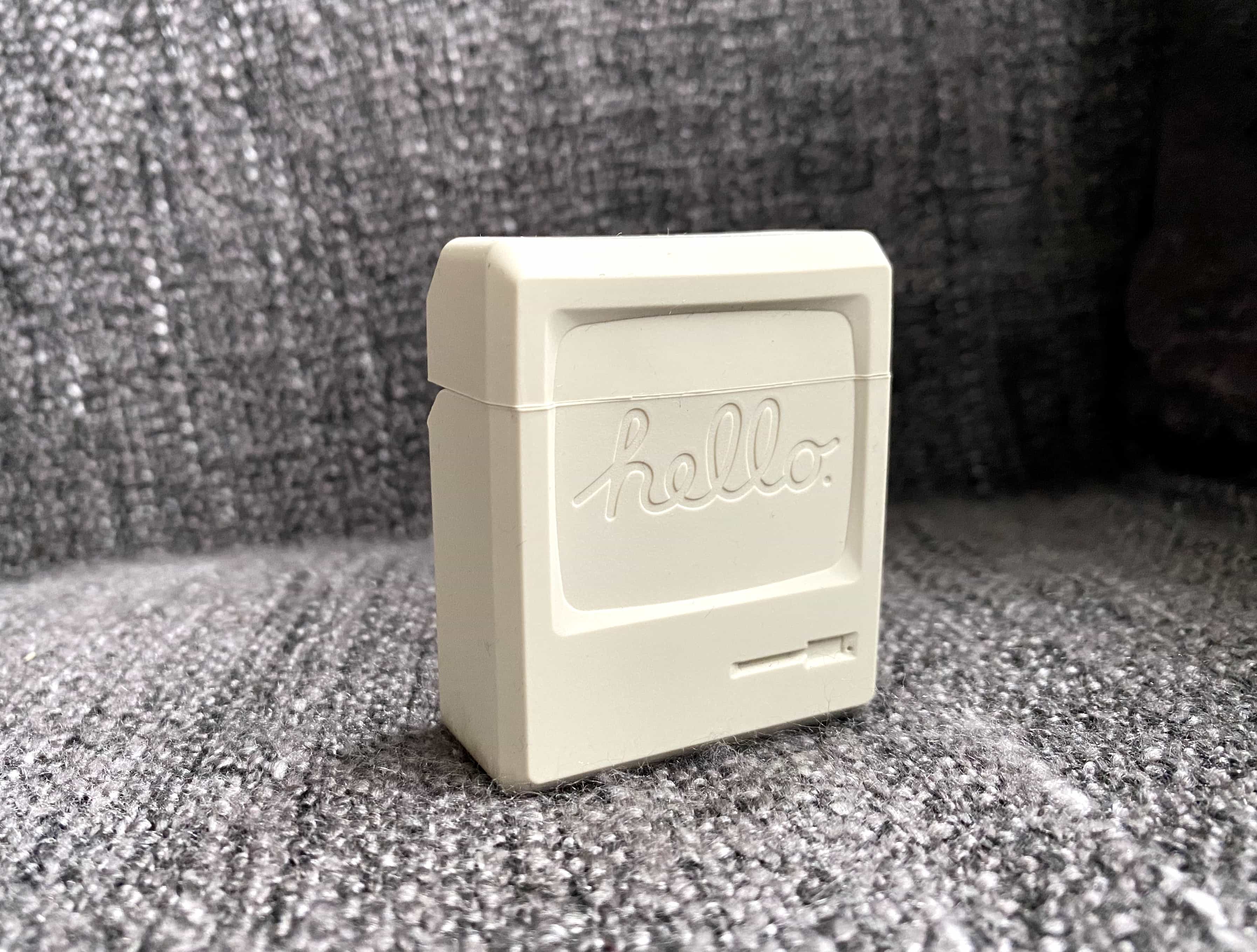
It looks like a tiny Macintosh! Photo: Killian Bell/Cult of Mac
AirPods won’t win any awards for their durability. Their shiny plastic case picks up scratches faster than a hip-hop DJ’s latest vinyl. So you should protect them with a decent case. And for Apple fans, nothing can beat this AirPods that case looks like a Mac.
AirPods cases don’t come much cooler than those from Elago. This one is like carrying a tiny little Macintosh with you wherever you go. And prices start at just $11.99.