iPad is a line of tablet computers from Apple Inc. running the iPadOS mobile operating system. These are low-cost products designed to appeal to young students, and anyone looking for a light-duty tablet.
iPad computers continue to be popular. Apple is the 500-pound gorilla of the global tablet market, shipping twice as many units as any of its rivals.
One of many Apple tablets
Apple’s makes a budget model called simply “iPad,” and that’s the computer described here. The most recent is iPad 11 from early 2025.
But the company also offers a range of other tablets in the product line up:
iPad Pro: The premium version, it boasts Apple’s latest Mac processor, an OLED display, and other advanced features. It comes in 11-inch and 13-inch variants.
iPad Air: The “middle of the road” option runs on a speedy M-series Mac processor, but not the latest. There are 11-inch and 13-inch variants for it, too.
iPad mini: The smallest tablet from Apple doesn’t skimp on features.
iPad in use
iPad is well suited for a variety of uses: browsing the web, checking email, playing games, reading books and magazines, and watching movies and TV shows. Students use them to attend class virtually and for homework, while professional users turn to them for email, editing documents and viewing PDFs.
Any iPad comes with a suite of useful applications written by Apple, and there are millions more available in the App Store.
There’s a wide array of accessories on the market. There are even an attachable keyboard cases with a trackpad to turn the tablet into a notebook.
iPad history
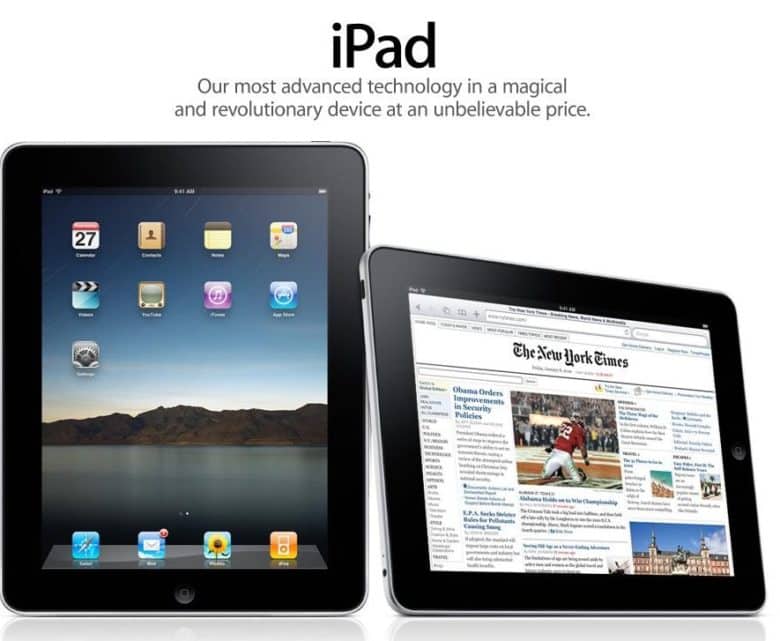
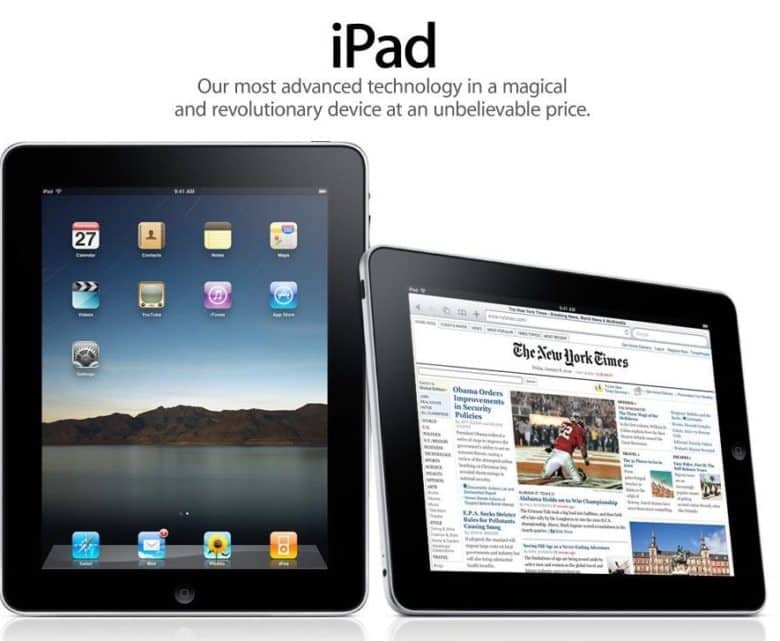
The first Apple tablet launched on April 3, 2010, as a larger version of the iPhone and iPod touch. That original model had a 9.7-inch screen, a 1GHz Apple A4 chip, and it debuted at $499, a considerably lower price than typical Windows tablets of the time. The product was an immediate success. Over a million units sold in less than a month — half the time it took Apple to sell that many iPhones. In iPad’s first year, Apple sold around 25 million of them.
The product line has gone through many successive generations since then, with the price dropping while the screen got larger. The iPad 11 has an 11-inch display and a powerful A16 chip, for example.
Carrying an iPad onstage eased that crippling stage fright. Photo: George Beckker@Pexels
Classical pianist Simone Dinnerstein has performed on stages around the globe, from solo recitals to collaborations with prestigious orchestras. Famed composer Philip Glass even wrote a concerto specifically for her to perform. But stage fright nearly ended it all — until iPad saved her career, according to a new interview.
We’re used to iPhone saving lives and what-not, so it’s cool to see Apple’s tablet get some credit.
Freeform is a weird and very underrated Apple app. Image: D. Griffin Jones/Cult of Mac
Apple’s Freeform app for iPhone, iPad, Mac and Vision Pro is a digital whiteboard you can use to brainstorm or gather ideas in one infinitely scrolling canvas.
You can use Freeform to throw together ideas with a colleague. You could build a presentation using Freeform’s scenes, kind of like using Prezi. Or, you can use Freeform as a drawing app with your iPad and Apple Pencil.
Freeform comes with all kinds of features for adding text boxes, rich links, drawings, clip art, sticky notes, files, photos, videos and more. It’s a great way to build a mood board or connect big ideas.
May 28, 2010: Customers across Europe and Asia queue up to buy the iPad when the international launch date for Apple’s original tablet finally arrives.
The reason for the gap between the iPad’s U.S. launch in early April and its international debut more than a month later? Unexpectedly large demand for the groundbreaking device.
iPadOS 19 rumors indicate it’ll bring iPad closer to the Mac. AI concept: ChatGPT/Cult of Mac
Rumors point to iPadOS 19 bringing the biggest improvements to iPad in years. The news is especially good for those who want their tablet to act more like a Mac.
With WWDC25 and the unveiling of iPadOS 19 mere weeks away, here’s what we already know about it.
It amounts to a big update. Photo: Rajesh Pandey/Cult of Mac
Rumors swirling ahead of WWDC25 give us a decent idea about what to expect in iOS 19. The new operating system, which Apple will showcase when its annual developer conference kicks off June 9, shapes up as one of the more significant iPhone software updates lately.
The iOS 19 overhaul promises to transform how users interact with their devices through big design changes, enhanced AI capabilities and improved cross-platform integration.
Don’t pay full price for the iPad mini 7. Image: Apple/Cult of Mac
A new iPad mini deal knocks a sweet $100 off the cost of the 7th-generation tablet. That’s up to 20% off, even though it’s only been on the market a few months. And the sale includes a range of colors and storage capacities.
Many people prefer this smallest of Apple tablets. It’s lighter and more portable than other models, but still offers the full iPad experience.
iPadOS 19 must allow the iPad to live up to its full potential. Photo: Rajesh Pandey/Cult of Mac
Rumors point to iPadOS 19 blurring the line between the iPad and Mac. With Apple reportedly focusing on “productivity, multitasking and app window management,” we put together a very specific iPadOS 19 wish list for features that could unlock the full potential of Apple’s tablets.
With WWDC25 just around the corner, here’s what we want to see in iPadOS 19.
The launch of the iPad 11 helped buoy tablet shipments in Q1. Photo: Apple
iPad shipments shot up 14% year over year during the first three months of 2025, according to a market analysis firm. That marks the fourth quarter in a row with an increase in iPad demand.
Replacing tablets bought years ago during the pandemic is only one of the reasons for the continuing strong growth.
With a variety of models to choose from, what the best iPad for you? Photo: Apple/Cult of Mac
You want the best iPad, but shopping for one can be overwhelming. Apple sells six iPad models in a wide range of sizes, prices and capabilities. Our iPad comparison explains the strengths and weaknesses of each model. You don’t want to get one that doesn’t have all the features you want, but you also don’t want to pay too much for features you won’t use.
Here’s some straightforward advice on picking the best iPad for you.
The budget iPad, which launched in March, offers solid performance for basic tasks like surfing the web, streaming videos and handling email. Plus, it comes with a welcome boost over the iPad 10’s base level of storage.
The iPad was the fastest-selling new product line in Apple history. Photo: iPad
April 30, 2010: Almost a month after the first-gen iPad went on sale, the first Wi-Fi + 3G iPads arrive in the hands of U.S. customers.
The devices ship in boxes identical to the Wi-Fi-only models, but with an additional sticker noting their cellular connectivity capability. The tablets come preloaded with micro-SIM cards branded AT&T, the only wireless carrier that initially supports the iPad.
According to a 2005 rumor, Apple planned to launch a 15-inch tablet. Photo: Ste Smith/Cult of Mac
April 13, 2005: The tech world gets excited when a sketchy rumor suggests Apple is building a tablet computer.
The Chinese-language report claims Quanta will build a 15-inch touchscreen tablet PC with detachable keyboard. Apple will supposedly ship the device in the first quarter of 2006. Things don’t turn out quite like that, but the rumor offers the first hint about Apple’s secret iPad project.
What if an Apple Pencil was a paintbrush instead? AI concept: ChatGPT
Apple engineers exploring ways to improve the Apple Pencil got a patent for a stylus tip that can change its shape or stiffness. The goal might be to make a paintbrush for an iPad so digital painting feels more like the real thing.
It’s a concept the company has looked into for years.
With the possibility of big price hikes looming, those looking to upgrade might want to act fast. Photo: Apple
President Donald Trump’s newly announced 54% tariff on Chinese imports sent shock waves through the tech industry, with Apple potentially facing billions in additional costs. This raises an urgent question for consumers: Should you rush to buy that new iPhone or MacBook before prices skyrocket?
You might want to accelerate the timing of that upgrade you had in the back of your mind. But those who aren’t desperate to upgrade might benefit from playing the waiting game. See the ins and outs below.
For most users, Apple Pencil (USB-C) gets the job done. Photo: Apple
Apple Pencil Pro may have all the bells and whistles, but a lot of average users don’t really need those. For a solid premium iPad stylus that does all the basic tasks like signing documents, note-taking and sketching, Apple Pencil (USB-C) gets the job done just fine. And right now you can get the stylus on sale with a Apple Pencil (USB-C) deal at Amazon, making it even more affordable. It’s just $69.
On launch day, people were very excited about the first iPad. Photo: Leander Kahney/Cult of Mac
April 3, 2010: The first iPad hits store shelves after months of anticipation. The tablet Apple CEO Steve Jobs called “magical and revolutionary” at its unveiling earlier in the year quickly becomes a major success.
Following years of rumors, Jobs initially showed off Apple’s first tablet on January 27, 2010. But the wait for the iPad is finally over … at least for people in the United States. (The iPad’s international debut won’t happen until May.)
Safari isn't the only options as default iPhone browser. You can change it. Image: Ed Hardy/Cult of Mac
You can easily change the default browser on your iPhone if you prefer to use Google Chrome, Mozilla Firefox, Microsoft Edge or any other alternative. Maybe you use a PC at home and want your bookmarks, history and passwords to sync to your iPhone. Or maybe you simply prefer something other than Apple’s Safari browser.
Whichever browser you set as your iPhone’s default will open when you tap on a link from Messages or Mail, get AirDropped a URL, scan a QR code, search the web with Siri and perform other tasks. This doesn’t mean Safari will be deleted, however. Apple’s stock app will remain installed on your iPhone if case you decide to switch back (which is super-easy).
Here’s how to change the default browser on your iPhone — and transfer your bookmarks and data, too. Keep reading or watch our quick video.
You create space in iCloud by deleting old backups. Here’s how. Image: Ed Hardy/Cult of Mac
It’s World Backup Day, a good opportunity to learn how to clear iCloud storage of old backup files made by iPhone and iPad. Are you running out of iCloud storage space? Worried about privacy? You might want to delete some old backups from the cloud.
The good news is erasing these files is easy if you know the steps to follow. Here’s how.
March 31, 2010: The world gets its first sense of how Apple’s tablet measures up, as the first iPad reviews hit the internet.
The consensus? That there’s no Flash, no USB, no multitasking — but Apple’s tablet offers an exciting new computing experience all the same. As USA Today writes, “The first iPad is a winner.”
Final Cut Pro now works with Image Playground. Photo: Apple
Big updates across Apple’s Final Cut Pro video-editing software lineup introduce AI-driven Image Playground integration, plus improved workflows and enhanced recording options.
Apple released Final Cut Pro updates Thursday that add Image Playground for Mac and iPad users. Plus, iPad users can use the software in portrait orientation for the first time.
Would an iPad by any other name smell as sweet? Photo: Apple
March 26, 2010: Apple pays up to settle a trademark dispute with Japanese multinational Fujitsu over the name “iPad” in the United States.
It comes two months after Apple CEO Steve Jobs first showed off the iPad, and around a week before the tablet will land in stores. As it happens, it’s not the first time Apple battled over the name for one of its new products.
★★★★☆
The Alogic Roam 21000mAh Power Bank keeps your gadgets going on the go. Photo: David Snow/Cult of Mac
Anyone who constantly moves around with multiple devices knows finding a reliable power bank for laptop charging can be a challenge. After more than a week of using the new Alogic Roam 21,000mAh Power Bank, I’m ready to share my hands-on experience with the premium charger. Is it worth the investment? Yes. Let’s dive in, and I’ll tell you why.
★★★★☆
The mid-range tablet is better than ever. Photo: D. Griffin Jones/Cult of Mac
The M3 iPad Air can do it all, as I found while testing Apple’s midrange tablet for this review. At its core, the thin, lightweight device proves perfect for living room reading, watching and browsing. Add the Magic Keyboard and Apple Pencil, and you can get some serious work done. It’s fast, powerful and remarkably capable.
I never previously owned my own personal iPad. I’ve used Windows PCs and Macs since 2002, switching to the Mac full-time in 2012. Between my Mac mini and Vision Pro, I haven’t felt the need for an iPad in my life.
Nonetheless, for this M3 iPad Air review, I went all-in, using the tablet with a Magic Keyboard and Apple Pencil for as much of my work as I could to see if I was missing out. Here’s what I discovered — keep reading or watch our video review.


 May 28, 2010: Customers across Europe and Asia queue up to buy the


 April 30, 2010: Almost a month after the first-gen iPad went on sale, the first Wi-Fi + 3G iPads arrive in the hands of U.S. customers.

 April 13, 2005: The tech world gets excited when a sketchy rumor suggests Apple is building a tablet computer.


 April 3, 2010: The first iPad hits store shelves after months of anticipation. The tablet Apple CEO

 March 31, 2010: The world gets its first sense of how Apple’s tablet measures up, as the first iPad reviews hit the internet.
 March 26, 2010: Apple pays up to settle a trademark dispute with Japanese multinational Fujitsu over the name “iPad” in the United States.
