Mac apps

Read Cult of Mac’s latest posts on Mac apps:

BuhoCleaner jacks up Mac performance (up to 70% off promo)

By

Photo of a MacBook on a table, with BuhoCleaner running on the screen
When your Mac shows signs of sluggish performance, BuhoCleaner can speed it up.
Photo: Dr.Buho

Is your Mac’s performance getting a little sluggish? If your machine takes more time to do things than it used to — and that darned spinning beach ball keeps showing up — it’s time for some digital spring cleaning. What’s an effective, intuitive and affordable tool for the job? BuhoCleaner, a Mac maintenance app from Dr.Buho.

BuhoCleaner is available in both free and paid versions. With coupon code CTM25BC05 you can get up to a 70% exclusive discount.

SPONSORED
This post is brought to you by Dr.Buho.

I tested it on my M4 Pro MacBook Pro and noticed a significant performance boost after just a few simple scans. The machine became noticeably more responsive when opening apps and files.

3 ways to emulate old video games and computers on your Mac

By

Windows XP, Mac OS 9 and Super Mario Bros. running in emulators on a Mac
Run Windows XP, Mac OS 9, Windows 11, Super Mario Bros. and more on your Mac.
Screenshot: D. Griffin Jones/Cult of Mac

Collecting old video game consoles and vintage computers is a fun hobby, but keeping all that hardware working can quickly become an expensive, never-ending task — not to mention all the space you need just to store the gear. You might instead (wisely) opt to play your favorite games and software using emulators for your Mac.

In this guide to Mac emulation, I’ll walk you through the best apps you can use to accomplish the two most common scenarios: playing old video games, and taking Classic Mac OS for a test drive on a modern Mac. Plus, I’ll wrap up with the easiest way to virtualize modern operating systems like Windows and Linux on your Mac. (This handy virtualization software also works for old and obscure computer operating systems.)

Best of all, each of these Mac emulation methods is free and open source.

How Raycast transforms the way I work on my Mac [Awesome Apps]

By

Raycast on Mac render
Raycast transforms how you get things done on a Mac.
Photo: Raycast/Rajesh Pandey/CultOfMac
Awesome Apps

Anyone who’s used a Mac for years understands the value of Spotlight search, as it can quickly help you search through your Mac, email, apps, and system settings. But if you want to take things to the next level, check out Raycast — a powerful Spotlight alternative that goes beyond simple search.

From setting reminders and tracking flights to running Terminal commands and finding files, Raycast is built for speed and efficiency. It really is a Swiss Army knife for your Mac. Here’s how I use it to supercharge my productivity on the Mac.

This AI-powered app takes notes for you, then summarizes them

By

Man working in front of a computer using AI note taker app My Noes AI
Get a lifetime of unlimited transcriptions and summaries for one low price.
Photo: Cult of Mac Deals

If you ever endured a long lecture or an hours-long all-hands meeting, you know this to be true: There’s no way you can jot down every single word your professor or colleague utters. Rather than scramble and stress about missing certain parts of a presentation, you could add an AI note taker like My Notes AI to your productivity tool kit.

This AI-powered note transcription and summarization app works with your iPhone, iPad and Mac to help you catch every single word. Think of it as your very own personal assistant! You can snag a lifetime subscription to My Notes AI for just $39.99 (regularly $299). That’s the best price you’ll find online.

Score a lifetime license to Microsoft Office 2021 for Mac for just $70

By

A lifetime license to Microsoft Office 2021 for Mac.
Enjoy lifetime access to Word, Excel, PowerPoint and more.
Photo: Cult of Mac Deals

Stuck using an older version of Microsoft Office? This offer gets you a lifetime license to Microsoft Office Home and Business 2021 for Mac for just $69.97 (regularly $219.99).

With a low one-time payment, you can bid farewell to Microsoft 365’s pesky recurring subscription fees. You’ll never need to pay again for Microsoft’s widely used software for work and school.

Price drop: Make PDF editing easier on Mac with PDF Expert

By

Upgrade your Mac's PDF-handling capabilities this Cyber Week for only $70.
Get PDF Expert, an Apple Editor's Choice winner, for less than $80.
Photo: Cult of Mac Deals

PDFs are arguably one of the most-used document formats by professionals, students and casual users alike. However, while they might be the best way to transmit documents, they’re not entirely easy to work with unless you own a capable PDF editor for Mac like PDF Expert.

Fortunately, this app makes handling, organizing, annotating, merging and editing PDFs effortless. And you can get a lifetime license to this award-winning Mac app for just $79.97 (regularly $139).

Price drop: Punch up your pix with this powerful Mac photo editor

By

Get AI-powered photo editing with Luminar Neo plus a library of add-ons for under $150.
Get an AI-powered photo editor, filters and more for just $159.99.
Image: StackSocial

Getting just the right shot is exciting, but any professional photographer will tell you that post-production work separates decent vacation snapshots from magazine-worthy images. That requires powerful photo editing software. And photo apps don’t come much more highly recommended than Luminar Neo, which lets you utilize AI to make your images look amazing.

Now there’s a great opportunity for new users to get this versatile software (for Mac or PC), along with hundreds of dollars worth of add-ons and training. You can get the Award-Winning Luminar Neo Lifetime Bundle for just $89.99. That’s a tremendous discount off the retail price of $682.)

Get this top-rated PDF editing software for the best price on the web

By

Photo of a computer with UPDF Pro PDF etiro on the screen, with a keyboard and other accessories on the desk.
Never struggle to edit a PDF again with this top-rated software.
Photo: Cult of Mac Deals

Whether you use a Mac or any other operating system, there is a universal truth we all know: Editing PDFs can be one of the most frustrating tasks on earth. The top-rated UPDF Pro app can make working with the file format easier, and lifetime subscriptions are on sale for just $47.97 (regularly $149.99).

That’s the best price on the web — and more than two-thirds off the regular price of this excellent PDF editor.

Price drop: With this Mac app, PDFs will never flummox you again

By

This PDF converter will boost your Mac's capabilities.
Try out this Mac-compatible PDF editor and converter instead of the pricey Adobe Acrobat Pro.
Photo: Cult of Mac Deals

Ever been annoyed when someone sends you a PDF instead of a file you can edit? An all-in-one PDF editor like PDF Converter Pro can help, and it doesn’t need to cost a fortune.

Lifetime licenses for the Mac PDF app are on sale for $24 with code SAVE20 (regularly $99.99) for a limited time.

Today in Apple history: Photoshop debuts as a Mac exclusive

By

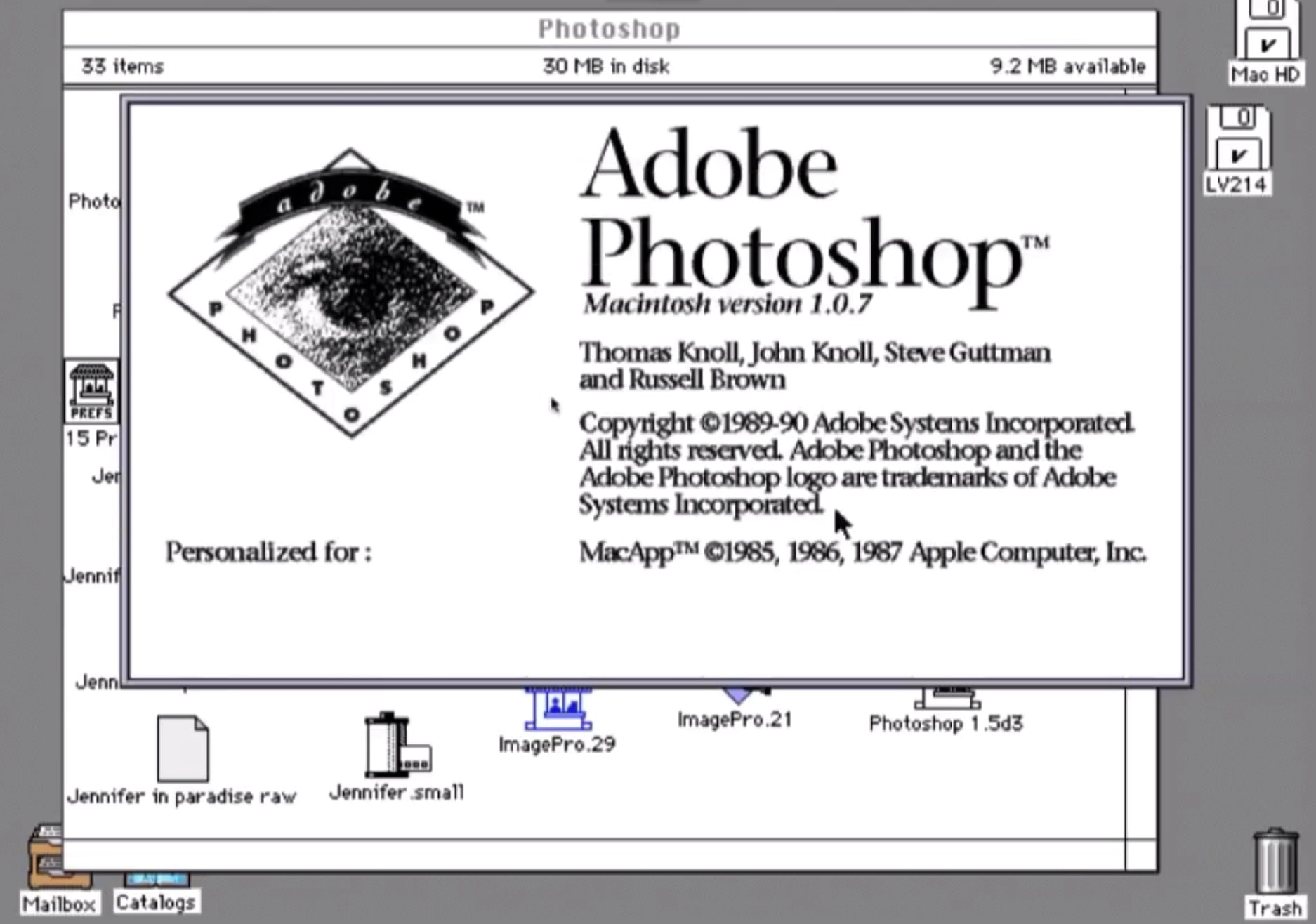
Adobe Systems' Photoshop launch changed the game for image editing.
Photoshop changed the game for image editing.
Photo: Adobe Systems

February 19 Today in Apple history: Photoshop debuts as a Mac exclusive February 19, 1990: Adobe ships the first commercial version of its soon-to-be-iconic Photoshop photo editing software. The Photoshop launch, exclusively on the Macintosh, gives users powerful new tools for tweaking digital images.

The groundbreaking software debuts for Mac System 6.0.3. Priced at $895, Photoshop will quickly become the standard editing tool for graphics professionals. Whether they work for advertising agencies, news organizations — or, frankly, anywhere else — Photoshop users take advantage of the program’s digital darkroom tools to seamlessly manipulate images.

Photography will never be the same.

5 Mac apps that supercharge my productivity

By

Powerful Mac apps
You should give these powerful Mac apps a try today.
Graphics: Rajesh Pandey/CultofMac

As a longtime Mac power user, I’ve come to rely on a handful of essential apps that supercharge my workflow. These Mac productivity apps not only streamline my daily tasks but also simplify complex jobs, making my work faster and more efficient.

Check out my favorite Mac apps that I can’t recommend enough as a power user.

Price drop: Every Mac deserves a quality PDF reader like this one

By

Get a Mac-friendly PDF tool for $30 for Black Friday.
Don't miss this limited-time price cut on PDF Reader Pro for Mac or PC. Get a lifetime license for less than $25.
Photo: Cult of Mac Deals

PDFs are supposed to make sharing documents easier, but they are often difficult to manage, edit or annotate. To streamline and improve your things, try PDF Reader Pro for Mac. The software tackles PDFs and empowers Mac users to do virtually whatever they’d like with them.

Plus, this great Mac app is on sale now at 50% off. You can grab a lifetime license for just $24.97 (regularly $59.99).

Your Mac is mistakenly flagging Docker as malware

By

Docker logo
False alarm! The Docker app for Mac is not a malware.
Photo: Docker

Getting a “Malware Blocked” warning on booting your Mac or when starting Docker? You are not alone. Hundreds of Mac users worldwide report seeing a similar message on their machine over the last few days.

The error is due to an issue with Docker, a popular platform designed to build and run apps using containers.

AirPods work even better with Mac, thanks to AirBuddy

By

Treat an Apple lover to a tool that improves AirPods utility on Mac: AirBuddy is only $8.
Enjoy enhanced AirPods functionality on Mac with AirBuddy, on sale now for only $8.
Photo: Cult of Mac Deals

Love the way AirPods work with an iPhone but a little meh about how they work with a Mac? The AirBuddy Mac app will connect AirPods to Mac, with enhancements that provide the same advanced features you enjoy when using Apple’s earbuds with an iPhone.

You can grab AirBuddy for only $8.99. (And if you don’t already own AirPods, and you’re a Costco member, don’t miss this hot deal on AirPods Pro with USB-C case. It’s somehow still going strong!)

Today in Apple history: QuickTime brings video to the masses

By

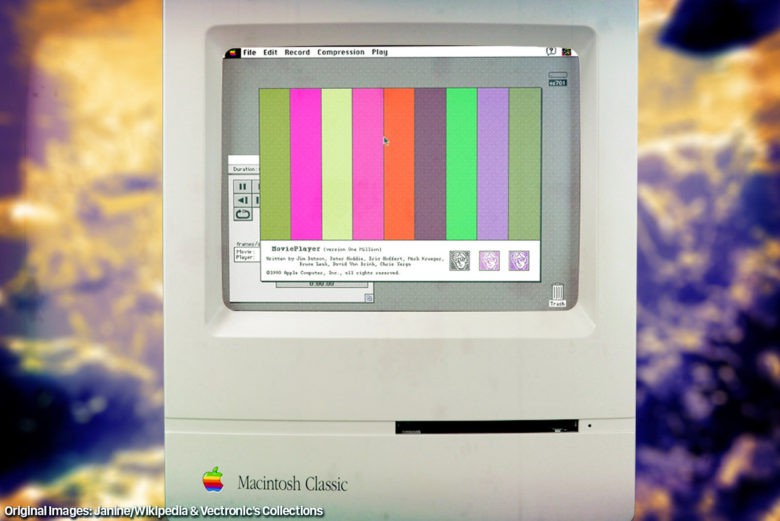
QuickTime brought multimedia to Macs -- and the masses.
Photo illustration: Ste Smith/Cult of Mac

December 2: Today in Apple history: QuickTime brings video to the masses December 2, 1991: Apple ships its first public version of the QuickTime player, bringing video to Mac users running System 7.

Containing codecs for graphics, animation and video, QuickTime confirms Apple’s status as a leading multimedia tech company. The software also starts us on the path to playing video on our computers. This fundamental transformation of Macs into media machines eventually leads to iTunes Movies, YouTube and more.

Get Microsoft Office Home & Business 2019 for Mac, just $24.97

By

Gift lifelong productivity with a lifetime of Microsoft Office Home & Business 2019 for Mac, now just $24.97.
Enjoy all of Microsoft Office 2019 on any Mac for less than $25.
Photo: Cult of Mac Deals

There comes a time in nearly every adult’s life when you must install Microsoft Office. Yes, you can technically get by without Word, Excel and the other essentials. But if you want to get certain tasks done on your killer Mac setup, you’ll need these tools. And this limited-time deal on Microsoft Office Home & Business 2019 for Mac might be the time to get them.

For a limited time, you can get yourself or a fellow Mac user lifetime access to Microsoft Office for Mac for only $24.97 (regularly $229).

This painting app for Mac offers pro tools at an affordable price

By

Product photo of the Paintstorm Studio painting app for Mac and Windows.
Get a lifetime license to Paintstorm Studio for just $19.99.
Photo: Cult of Mac Deals

For digital artists, illustrators and anyone with a passion for creating art, Paintstorm Studio is a versatile toolkit. With a lifetime license, you gain access to an intuitive, high-powered painting app for Mac and Windows, without the hassle of monthly subscriptions.

Designed for professional artists but priced for everyone, Paintstorm Studio is the only digital art software you’ll need. And right now, you can score a lifetime license for just $19.99 (down from $49) — no upgrades or pricey add-ons required.

Quickly change file formats for free with Movavi’s Online Video Converter

By

Image showing features of Online Video Converter by Movavi
Whether you shot the video or not, sometimes it's just in the wrong file format.
Image: Movavi

When you need to convert a video to a different file format, what’s a quick, easy way to do it? Movavi’s free Online Video Converter. This incredibly intuitive tool makes the tedious task simple.

And if you need to convert really big video files, or edit them, Movavi’s desktop converter software can help. More than 70 million users in more than 190 countries enjoy software from Movavi, which turned 20 years old in 2024.

Find out how to use the free online video converter below.

Easily delete your Mac’s system junk with JWizard Cleaner

By

System files piling up all over the place in your Mac will eventually slow it and might crash it.
Photo: Brett Sayles/Pexels/CC

Just as your house accumulates dust and trash, your computer gets cluttered with unnecessary, often automatically generated, files known as “system junk.” The files pile up gradually and then start affecting your Mac’s performance. Fortunately, simple tools like JWizard Cleaner quickly and easily clean up your Mac so you don’t need to do it manually.

Get all the great apps in Adobe Creative Cloud at a huge discount

By

Product photo of the Adobe Creative Cloud.
Get a three-month Adobe Creative Cloud subscription on sale for just $75.
Photo: Cult of Mac Deals

Whether you’re a professional graphic designer, an aspiring photographer or a hobbyist exploring your creative side, it’s worth it to invest in software that really lets your creativity run wild. This Adobe Creative Cloud discount gains you access to more than 20 Adobe apps that professionals love, including Photoshop, Illustrator and Premiere Pro.

Normally, this three-month subscription to Adobe Creative Cloud would cost $179. But the price dropped recently to $75 — although that’s not going to last much longer.

Today in Apple history: Logic Pro 7 shows Apple is still serious about creatives

By

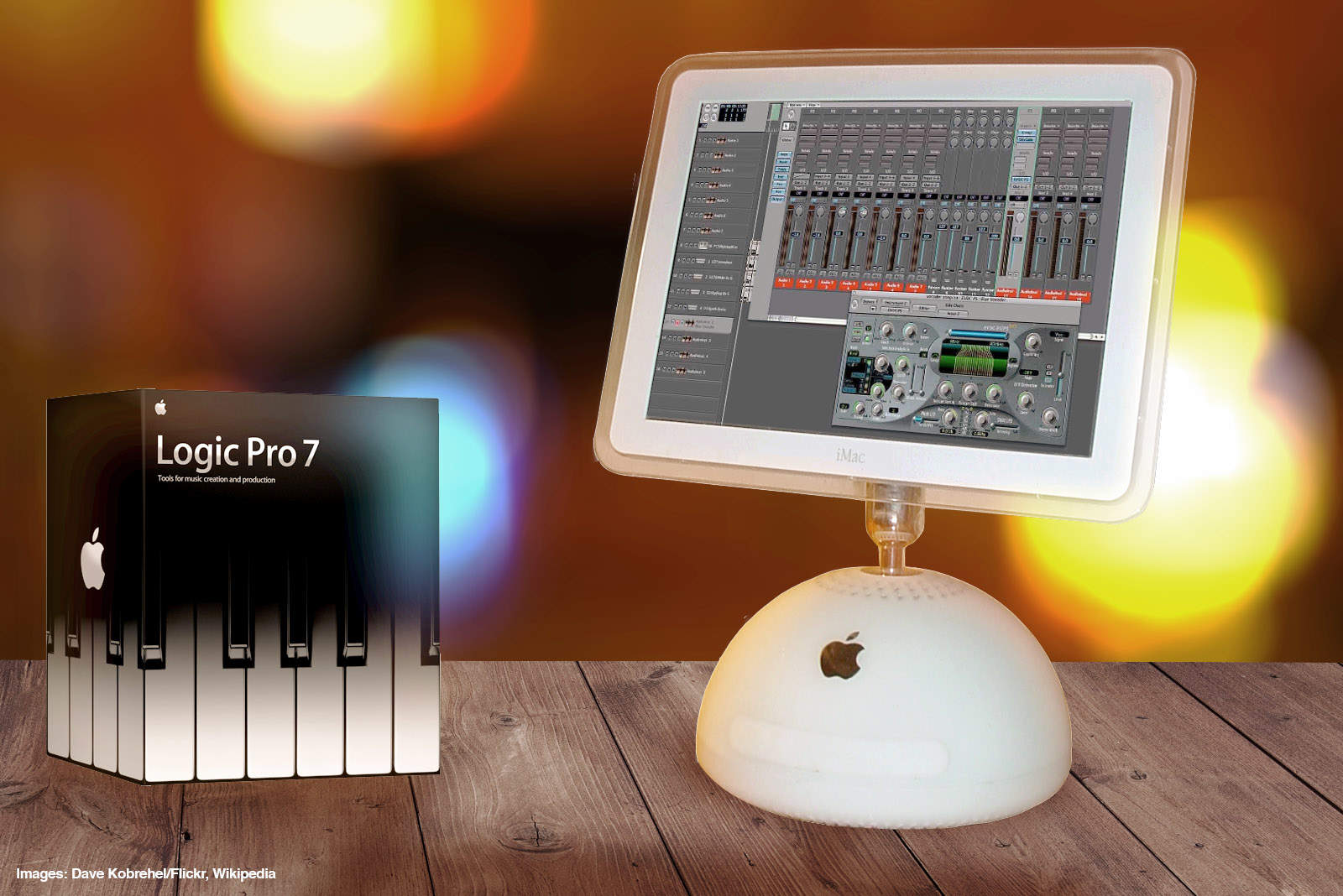
Logic Pro 7 was a great music creation tool for Apple fans.
Photo: Ste Smith/Cult of Mac

September 29: Today in Apple history: Logic Pro 7 launch shows Apple is still serious about creatives September 29, 2004: Apple debuts Logic Pro 7, its professional music creation and audio production software. The update brings new tools and a streamlined interface in line with other Apple software.

Coming off the success of the iPod and the iTunes Music Store, the Logic Pro 7 launch — alongside its stripped-down sibling, Logic Express 7 — serves as a reminder of Apple’s dominance in music tech, for consumers and professionals alike.

Your key to the PDF kingdom — just $60 for life

By

Man accessing PDF Reader Pro Permanent License on his laptop.
Don't miss your chance to score a PDF Reader Pro Permanent License at a big discount.
Photo: Cult of Mac Deals

If you find yourself working with PDFs day in and day out, a PDF Reader Pro Permanent License could become your new best friend. This lifetime subscription to the excellent PDF editor for Mac costs just $60 (regularly $79) and lets you convert PDFs to Microsoft Office file formats.

This powerful tool is the solution you need to streamline your workflow and make working with PDFs much less of a hassle.

Yes, you can get Photoshop for Mac without the pricey subscription

By

Product photo of the Adobe Photoshop app on the computer, to advertise a sale on Adobe Photoshop Elements and Premiere Elements.
Bring your artistic vision to life with this discounted Adobe Photoshop & Premiere Elements 2023 bundle.
Photo: Cult of Mac Deals

Want Photoshop’s photo editing capabilities without Adobe’s monthly subscription fees? This Mac software bundle combines Photoshop Elements and Adobe Premiere Elements to give you plenty of creative firepower for life — all for one low price. It’s the Photoshop Elements sale the subscription-averse have been waiting for!

Jump on this deal to make your photos and videos look better than ever.

6 useful apps hiding in your Mac

By

No Downloading Required
Nothing to download or install — you’ve already got ’em.
Image: D. Griffin Jones/Cult of Mac

If you work on a Mac, these six useful apps can help you get that work done faster. And you don’t need to take time to download them or figure out if they’re worth the price — you already have these apps on your computer.

These come with every Mac, and you can locate them in the Applications and Utilities folders. If you’re in the Finder, just hit Shift-Command-A (⇧⌘A) or Shift-Command-U (⇧⌘U) to find them.

I’ll walk you through a few of the more useful Mac apps hiding there that you probably haven’t heard of.